Purchases

kafinea logo svg

Supplier orders

APPROVALS

kafinea logo svg

Reports & charts

Pricing & invoice requests

Automation at the service of purchasing

  • AI Assistant for Text Fields

    Automatically summarize, expand, rephrase, or correct your textual content to gain precision and fluidity.

  • AI Prompt

    Use AI in Kafinea workflows to understand a situation and automate actions.

  • AI-powered advanced search

    Benefit from intelligent search that goes beyond semantics, understands the meaning of your queries, and provides relevant results.

  • AI-Powered Automations

    Integrate AI prompts into your workflows to automate calculations, analyses, and decision-making based on your ERP data.

  • Autonomous AI Agents

    Entrust complex missions to intelligent agents who break down tasks, execute them in the necessary order, and continuously adapt their actions.

  • Customizable price lists

    Create and apply specific price lists for your customers and suppliers to save time during your transactions.

  • Customizable workflows

    Create your workflows to automate record creation, field updates, email sending, and much more.

  • Interactive AI Chatbot

    Ask questions about the data you have access to and receive instant answers, in text, tabular, or graphical format.

  • MCP Server for External AI

    Connect external artificial intelligence to Kafinea to enhance your automated processes and expand your capabilities.

  • Reminder notifications

    Customize your reminders (pop-up window, email, or SMS) and their triggers.

  • REST API

    Synchronize data in real time between the platform of your choice and your Kafinea instance.

  • Scheduled Reports

    Configure periodic email delivery of a report in table or chart format.

  • Web forms

    Import the data received from a contact form and use it in Kafinea.

  • Webhooks

    Send data to other platforms regarding an event that has just occurred.

Advanced purchasing management features

  • Advanced per-user access rights

    Choose which actions are allowed or which information is visible for each user, down to the field level.

  • Comments with Attachments

    Share information and documents between collaborators via the Comments block in Kafinea records.

  • Customizable fields

    Add your own input fields, picklists, date pickers, URLs, etc.

  • Dependent Picklists

    Establish a relationship between two picklists, enabling the choices in one to dynamically adjust based on the selection in the other.

  • Dynamic and Customizable Email Templates

    Easily create your own dynamic email templates using shortcodes.

  • Dynamic and customizable PDF templates

    Design as many dynamic PDF templates as desired using shortcodes.

  • Filtering records by tag

    Group different records under the same tag to easily find them in one place, even if they come from different modules.

  • Relational tabs

    Switch from one record to another related record in one click via relational tabs.

  • Reports and Charts

    Visualize real-time key information from your chosen module via tabular and graphical reports.

  • Send SMS

    Send a text message to a prospect, customer, supplier, or collaborator with one click.

Basic purchasing management features

  • CSV Data Import

    Import data via a CSV file by mapping the columns from the original file to Kafinea fields.

  • Custom naming sequences

    Set the prefixes and suffixes for your document names and their incrementing.

  • Customer and Supplier Accounting Accounts

    Simplify your accounting by linking your customers and suppliers to their corresponding accounting account.

  • Customizable blocks

    Organize your records into accordion blocks to group your fields.

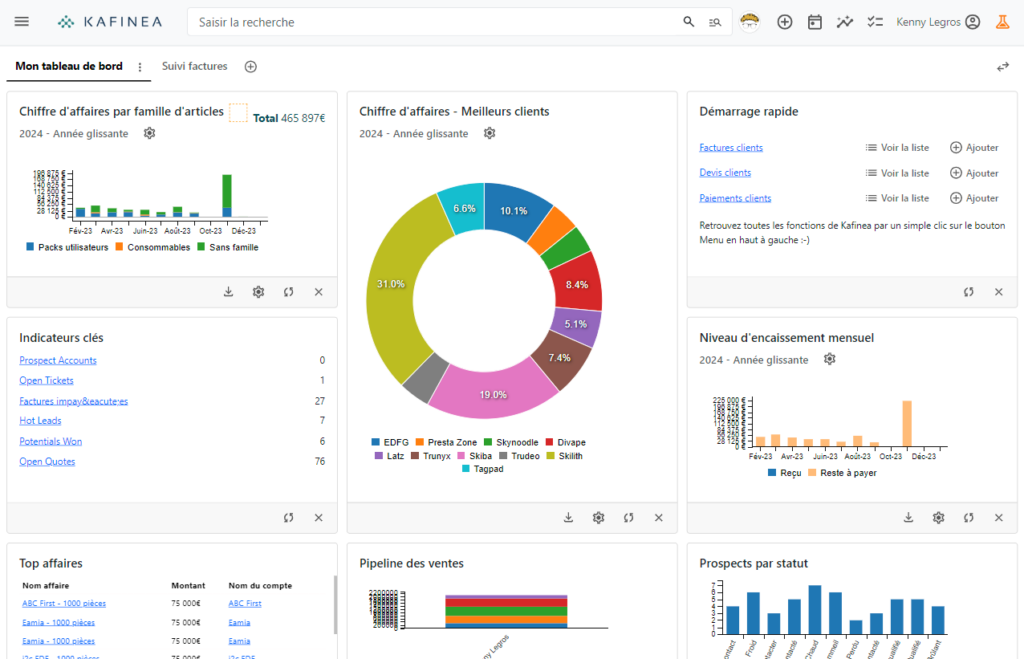
  • Customizable dashboards

    Create your own individual dashboards and easily find the information that matters to you.

  • Dynamic Widgets

    Create your own widgets on your dashboards and visualize your data more easily.

  • Export Data to PDF Format

    Export the data of your choice to PDF format.

  • Filtered views

    Create data lists with filtered views that you require on a regular basis.

  • Illustration Images

    Illustrate your listings with an image for easier identification within your interfaces.

  • Manual Payment Entry

    Manually enter a payment received in person, such as by check or cash.

  • Multi-currency management

    Do business with your international customers—Kafinea supports multiple currencies.

  • Record duplication

    Duplicate a record in one click.

  • Record Tracking

    Be notified of updates to a record you follow, resulting from an action by a colleague or an automation.

  • Sections in business documents

    Divide the lines of your business documents into sections to make them easier for your customers and suppliers to read.

  • Sending Emails

    Send an email to a prospect, customer, supplier, or collaborator with one click.

  • Storage locations

    Define a storage location per item or item category.

Unleash your business potential now.